Can I ask questions of my own AI chats?
Yes, with Ask Your Archive, a Hubort Pro feature. You ask in plain words, and it answers from your own chats across every account you sync, with links to the conversations it used. It runs on your own Anthropic or OpenAI key. The search itself happens on your computer. What goes to the provider you chose is your question, to ask for related words to search for (a setting you can switch off), and then your question with a few short excerpts, to write the answer, after anything that looks like a password or a key has been masked in them. None of it goes through a server of ours.
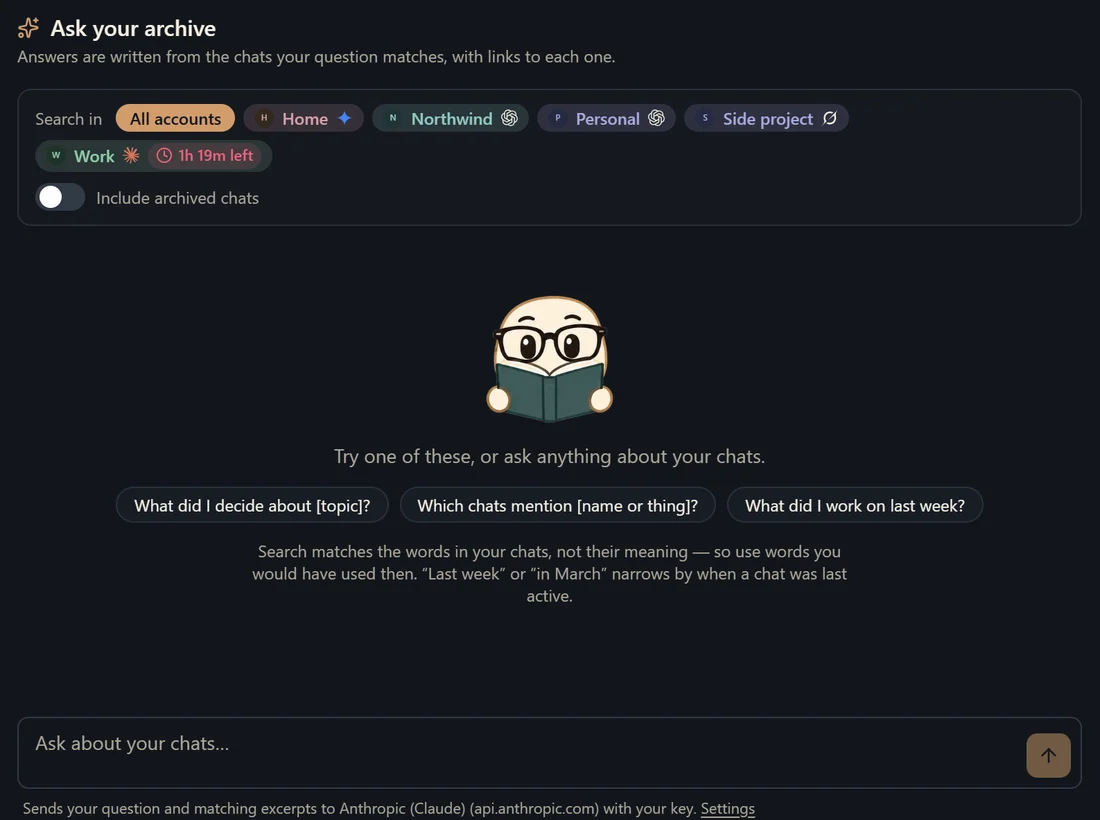
What is Ask Your Archive?
A Hubort Pro feature: you ask a question in plain words, such as “what did I decide about the pricing page, and in which account?”, and get an answer written from your own chats, with links to the conversations it came from. It runs on your own Anthropic or OpenAI key, which you supply, so your provider bills you and Hubort adds no charge per question.
Each answer names its sources, and the sources panel shows the excerpts it was written from, so you can open the chat and check. You can limit a question to some of your accounts, and follow up on an answer.
Where do my chats go when I ask a question?
Searching your chats happens on your computer, in your local database. Two requests go to the provider you chose, straight from your computer on your own key. The first sends your question alone, to ask for a few related words to search for; it is the setting “Search related words too”, on by default, and you can switch it off. The second sends your question with a few short excerpts of the matching conversations, at most three passages from each of at most eight conversations, to write the answer; for a follow-up, your last few questions and the answers you were given go with it, so the provider can follow the thread. Hubort has no server to route either through. Anything shaped like a password, an API key or a card number is masked in the excerpts first.
What the sources panel shows and what the provider receives in the excerpts are the same text, because the masking happens after Hubort picks the excerpts and before anything is shown or sent. Closing the question stops the request to the provider. Your key is kept in its own file on your computer, apart from your chats; “Turn off and forget every saved key” in Settings removes it at once. The first time you use a provider you are asked to agree to sending to that company, and switching from Anthropic to OpenAI asks again. The privacy policy has the same row, in its own words.
Do I need an API key, and what does it cost?
You need an API key from Anthropic or OpenAI, which is separate from a ChatGPT or Claude subscription and is made in the provider's own developer console. Hubort ships with no key and adds no charge per question: the provider bills you at its own prices, which it sets and changes, so check its pricing page. Ask is one of the five Pro features. Pro is $9.99 a month, $59 a year or $149 once, and every install starts with 14 days of everything with no card, so you can try it first. There is also a mock mode, which sends nothing anywhere, for seeing how it works without a key.
How does it find the right chats?
By the words in them. Hubort takes the words from your question, asks your provider for a few related words unless you have switched that off, searches the database on your computer, reads the best 24 or so matching chats, and picks the passages that match best. The choosing is keyword matching, not embeddings, so a question whose words appear nowhere in the chat you mean can miss it, even with related words. Asking the way you would have put it at the time helps. Related Chats, another Pro feature, is the one that finds chats about the same thing without shared words.
How is it different from asking ChatGPT or Claude about my history?
It reads every account you sync. ChatGPT's account switching does not share conversation history between accounts, and Anthropic's page on Claude's chat search describes no search over a second account (what OpenAI and Anthropic say, word for word). Ask Your Archive reads all the accounts you sync, from every browser profile, and sends the provider your question and a few excerpts, on your key, not your whole history. Some other tools keep a copy of your chats in their own cloud for this: LLMnesia's Ask Vault is part of its paid, encrypted Vault. Hubort has no cloud copy.
What are its limits?
Three, so you hear them from us. It answers only from the excerpts it was given, so an answer can be wrong or incomplete, and the links are there to be checked. It reads only chats already in Hubort, so a service that has stopped syncing is missing what came after. And the masking is a net over well-known shapes of secrets, not a guarantee: a secret in a shape nobody wrote a pattern for would still go through. If chats hold anything you would not send to a provider, leave Ask off. It is off until you set it up.
How do I try it?
Install the app, sync a few chats, then set Ask up under Settings. Every install starts with 14 days of Pro.