Can Claude or Cursor search my ChatGPT chats?
Yes, with the MCP Connector, a Hubort Pro feature. The AI apps on your computer, such as Claude, Cursor, VS Code with Copilot and Codex, can look things up in every chat Hubort keeps, from every account and every service, so they can use what you already worked out with another AI. Hubort adds itself to the app's settings with one click. Apps can only search and read: nothing is changed or deleted, and each one sees only the accounts you allow.
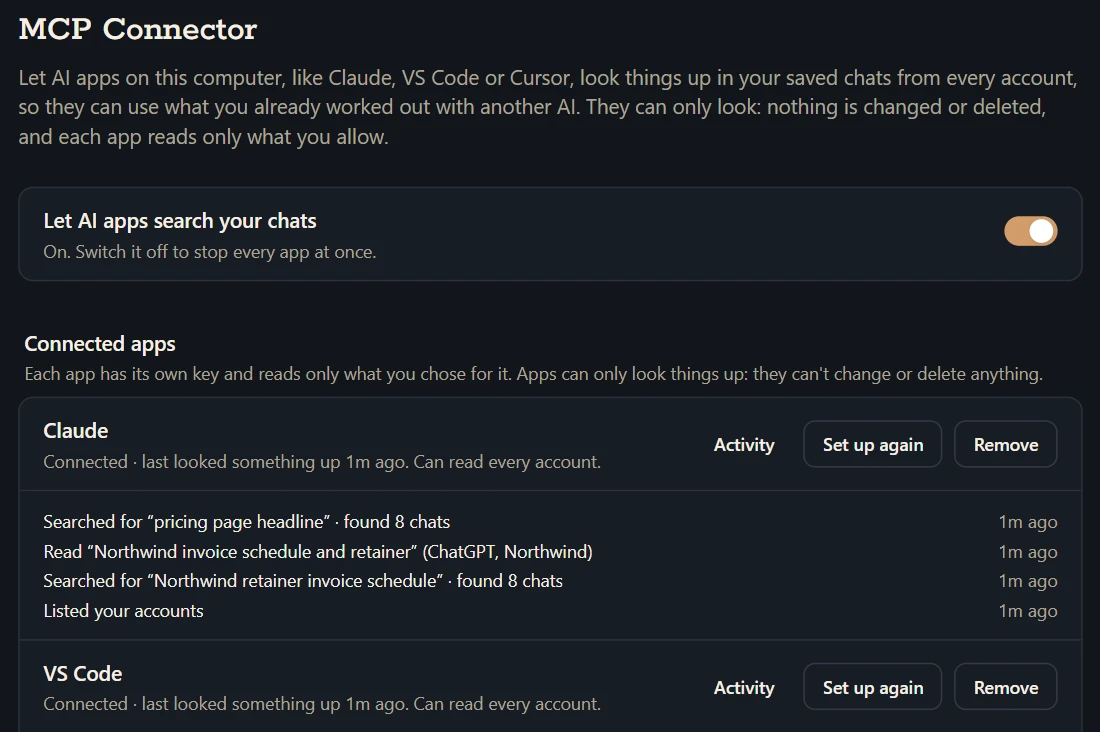
What is the MCP Connector?
A Hubort Pro feature that lets the AI apps on your computer, such as Claude, Cursor, VS Code with GitHub Copilot or Codex, look things up in your saved chats from every ChatGPT, Claude, Gemini and Grok account you sync. Ask Claude “what did I decide about the pricing page with ChatGPT last month?” and it searches Hubort, reads the chat, and answers with a link to it. MCP, the Model Context Protocol, is the standard these apps use to reach tools on your computer.
An app gets six things it can do: search your chats, read one, list the recent ones, list your accounts and folders, and find chats about the same thing as one it found, by meaning rather than shared words. Each search answer comes with the passages that matched and where each one is in its chat, so the app reads only what it needs.
Which apps can connect?
Apps that run MCP servers on your computer:
- Claude, the Claude app: Chat, Cowork and Code
- VS Code, GitHub Copilot's chat
- Cursor
- Codex, OpenAI's app and extension
- Antigravity, Google's editor
- Claude Code in a terminal
- Windsurf
- Gemini CLI
- LM Studio, models running on your computer
- Any other app that runs local MCP servers
The ChatGPT app can't connect: it reaches tools only on the internet, and Hubort keeps your chats on your computer. Agents that run on someone else's computer, such as OpenAI's Dots or Meta's Muse, can't reach it either, for the same reason. Hubort doesn't offer a way to put your archive on the internet for them.
How do I set it up?
- In Hubort, open Settings → MCP Connector and switch on Let AI apps search your chats.
- Click Connect…, choose the app and what it may read: every account, some accounts, or some folders.
- Click Add Hubort to Claude (or Cursor, or VS Code). Hubort adds one entry to that app's own settings file, keeps a copy of the file as it was, and changes nothing else.
- Quit the app completely and open it again, then ask it: “Use Hubort to list my accounts.”
If the app isn't on this computer, or its settings file has something in it Hubort can't read safely, you get numbered steps to do it by hand instead. Settings shows which apps are connected and what each one looked up, and Remove stops an app at once and takes Hubort back out of its settings.
The connector is also listed in the official MCP Registry (io.github.Fazy221/hubort) and on Smithery, for apps and people that look servers up there. Either way it needs Hubort's desktop app on the same Windows computer.
Where do my chats go when an app reads them?
Hubort itself sends nothing anywhere: the app asks Hubort's server on your computer, and Hubort answers it there. What the app reads then becomes part of its own conversation and goes wherever that app sends things, which for Claude, Cursor, VS Code or Codex is their AI service, the same as anything you type to them. With an app that runs its model on your computer, such as LM Studio, it stays on your computer. Anything shaped like a password, an API key or a card number is masked before an app sees it.
Each app has its own key, which opens searching and reading and nothing else, and only for the accounts or folders you chose. Accounts that the free tier has paused are invisible to every app. Switching the connector off stops every app at once. The privacy policy says the same, in its own words.
What are its limits?
Four, so you hear them from us. An app searches by words, the way Ask Your Archive does, so a chat that says what you mean in other words can be missed; finding chats by meaning works once the app has one to start from. Apps read only chats already in Hubort, so a service that has stopped syncing is missing what came after. The masking is a net over well-known shapes of secrets, not a guarantee. And old chats are text from anywhere, pasted pages included: Hubort tells every app that what it returns is reference material, not instructions, but an app that can also run commands or browse the web is only as careful as that app, so connect the ones you trust and let each one read only what it needs.
How much does it cost?
It is one of Hubort's Pro features, with Ask Your Archive, Related Chats, Live Sync and Usage Insights. Pro is $9.99 a month, $59 a year or $149 once, and every install starts with 14 days of everything with no card, so you can connect your apps and try it first. Hubort runs on Windows 10 and 11.