Can you search Grok chats across two accounts?
Not with Grok, as far as Hubort found. grok.com keeps the history of the account you are signed in to, and its usage limits are per account too. Hubort is a Windows app that reads the chats of every Grok account you sync, on your own computer, searches all of them at once, and shows which account still has usage left.
SpaceXAI's Terms of Service (last updated 11 September 2026) and Acceptable Use Policy (effective 14 August 2026) were read on 6 October 2026. They say nothing about several accounts, so the rest of this page is what Hubort found using grok.com, last read on 16 September 2026, and it may have changed.
Can I search Grok across my accounts?
No, as far as Hubort found. grok.com lists the chats of the account you are signed in to. Its account menu had no switcher and no “add account” in either account Hubort looked at, and the sign-in details it loads named a single person, so a browser profile holds one Grok account at a time. A second account is another sign-in, and another list.
Is Grok on x.com the same history?
No. Grok on x.com keeps a separate history. A chat started there never appeared on grok.com, and x.com's Grok history showed none of grok.com's chats. SpaceXAI's Terms draw the same line:
“Use of Grok on the X platform is not governed by these Terms.”
Hubort reads grok.com only. If you use Grok in both places, Hubort's search covers the grok.com half.
Which Grok account has usage left?
Grok's limits are the other reason people keep a second account. SpaceXAI's Terms say they exist:
“At our sole discretion, we may implement rate limitations to accommodate system resources or usage needs.”
They don't say what the limits are, and grok.com shows how much of its allowance an account has left in a box in the chat, and the figure behind it is per account and per mode: in what Hubort read, a blocked account's Fast mode had run out while its other quotas were untouched. Hubort reads that figure on each sync and shows it as a badge beside the account, with the time it is expected back once an account runs out. So with two Grok accounts you can see which has room before you start a chat, instead of finding out in the middle of one.
What do people try instead, and why does each fall short?
Three things, and none of them gives you one search. Each does something useful; none of them makes two accounts searchable together.
- Signing out and in. It works, one account at a time, and the chat is in whichever one you didn't open.
- One browser profile per account. It keeps the sign-ins apart, which is why Hubort asks for one extension per profile. The chats stay where they are, so on its own it is still one account at a time.
- Pasting the good chats into notes. It catches the chats you thought to save. The one you needed was never going to be one of them.
How does Hubort search Grok across accounts?
Hubort is two installs: a Windows app, where your chats live and where you search them, and an extension for each browser profile you use AI in. The extension reads your grok.com chats with the session you are already signed in with in that browser and hands them to the app. You name each account, and one search box then covers all of them, each result in its own account's colour, next to your ChatGPT, Claude and Gemini chats if you sync those too.
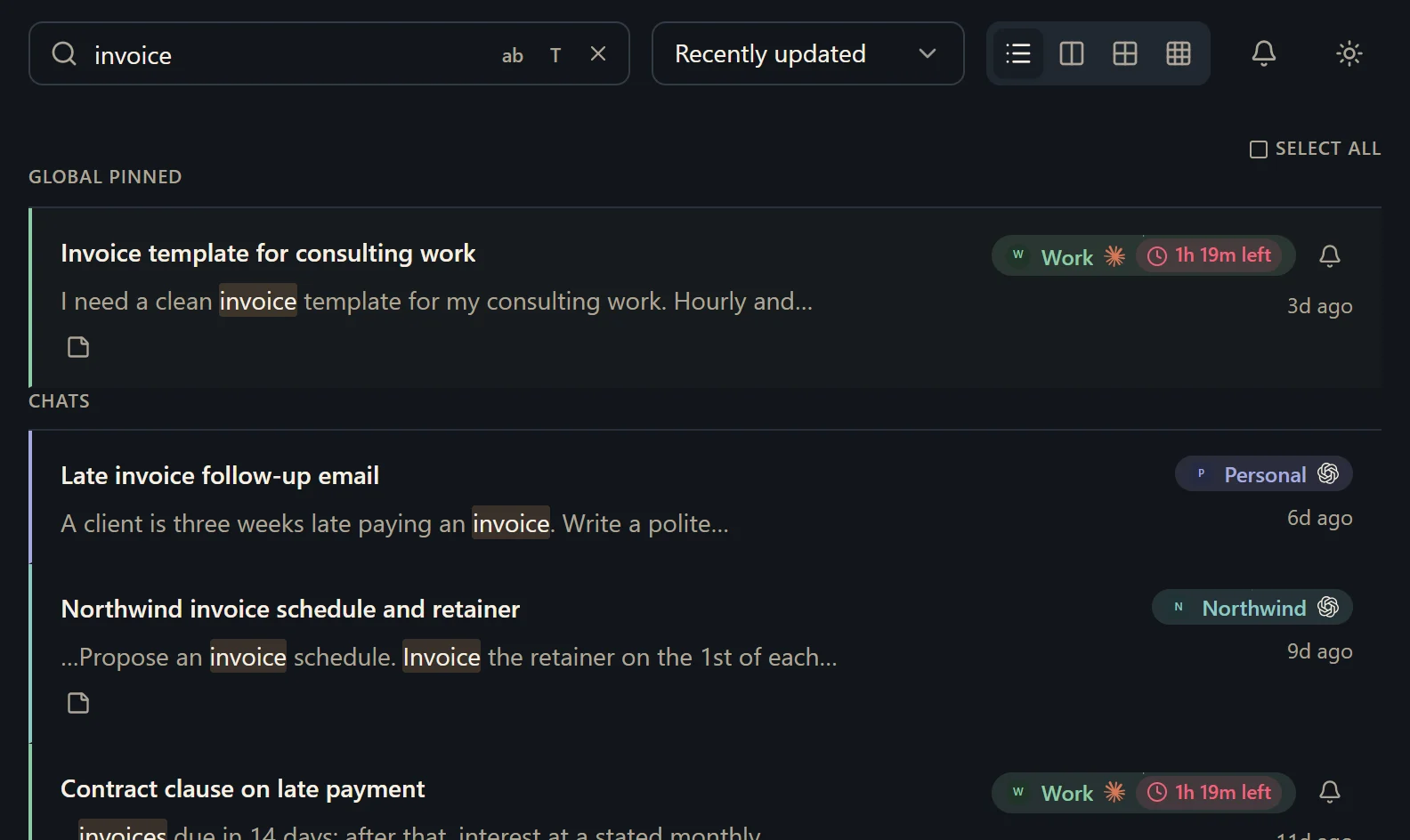
Nothing goes to a server of ours, because there isn't one: the chats sit in a database on your own computer, which you can read with any SQLite tool and export as Markdown whenever you like. Hubort only reads. It never sends, renames, archives or deletes anything in Grok.
Does Grok allow a tool like Hubort to read my chats?
This is the one to read before you tick Grok. Hubort's extension reads grok.com by itself, on a schedule, with the session you are signed in with. SpaceXAI's Acceptable Use Policy lists, among the things it bars:
“Accessing the Services through unauthorized automated or non-human means, whether through a bot, script, or otherwise”
The policy says “unauthorized”, and it doesn't say what SpaceXAI would call authorized, so we can't tell you it would treat yours as allowed, and we would not assume it does. It also bars “using bots to access” the Service and “circumventing any rate limits”, and says violations “could result in action against your account, up to suspension or termination.” Hubort reads only: it never sends a prompt, and it waits when grok.com slows it down. It still reads by script. Any consequence would fall on your Grok account, not on your Hubort install.
Your choices are to leave Grok unticked in the extension's popup, or to lengthen the interval, which can go up to an hour. The other services' terms are discussed in the privacy policy; for Grok we have read the policy's own wording, and it is plain.
What should I know before I try it?
It is Windows 10 and 11 only, for now. It is free for two sources. A source is one account on one provider, however many browsers it syncs from. So two Grok accounts are two, and a third is a third. Every install also starts with 14 days of everything, with no card. More accounts start at $4.99 a month, and the pricing page has yearly and buy-once prices.
If grok.com slows Hubort down, with a rate limit or a check on your network, Hubort stops asking and waits before it tries again, and the extension's popup says it is waiting. Everything it has already read stays searchable.
Two things you should hear from us. The installer is not code-signed yet, so your browser and Windows will each warn you about it, and the download page says exactly what you will see. And Hubort reads each service's web app on a schedule, which may be inconsistent with that service's terms; the privacy policy has the full note, and you can lengthen the interval or untick a service at any time.
How do I try it?
Install the app, then add the extension to each browser you use Grok in. The setup guide walks through every step, and the download page has both.
The same question for other services: ChatGPT, Claude and Gemini.