Can you search Gemini chats across several Google accounts?
Not with Gemini. It shows the chats of one Google account at a time, and Google's help pages describe no search across accounts. Hubort is a Windows app that reads the chats of every Google account you tick in your browser, on your own computer, and searches all of them at once. Every result shows which account it came from.
Google's pages were read on 3 October 2026.
Can I search Gemini across my Google accounts?
No. Gemini lists, and searches, the chats of the Google account you are using. Google's help page, Find & manage your recent chats in Gemini Apps, tells you to open the menu, click Search, type what you want to find and press Enter. It describes no search over a second account, and the reason is in how Gemini keeps chats:
“When you are signed in and Keep Activity is on, Google stores your Gemini Apps activity in your Google Account.”
The chats belong to the account, so the chat you want is in one of your accounts and you find
out which by opening each. That is easy to get wrong, because gemini.google.com addresses the
accounts by position: the first account you signed in to is /u/0 in the address,
the second /u/1, and the positions move when anyone signs in or out. That is what
Hubort found reading it, not a sentence from Google's help pages.
Why can't I find an old Gemini chat?
Three things can leave a chat out of the list in front of you.
- You are in a different Google account. Gemini opens as whichever account the address names, so the same chat is there or missing depending on which one you opened.
-
Keep Activity is off for that account. Google's page
says what it still does with the conversations:
That reads as a limit on how long Google holds them, not as a history you can open later. Google says Keep Activity is on by default if you're 18 or over, and the chats page says that for a personal account its features are only available with Keep Activity turned on. In Hubort's testing, a Google account with it off has no chats to read at all, so there is nothing for any tool to search. Turning it on keeps chats from then on.“Even when Keep Activity is off, your conversations will be saved with your account for up to 72 hours to allow Google to provide the service and process any feedback.”
-
It is a work or school account. Google's page says who
controls those:
Google's setup page for the Android app lists what you need: “A personal Google Account or a work or school Google Account that has access to Gemini Apps.” So someone can have both, with their chats in two accounts, and the work one follows rules that someone else sets.“If you're using Gemini Apps with a work or school account, your Gemini Apps Activity is controlled by your Google Workspace administrator and you can't delete chats.”
What do people try instead, and why does each fall short?
Three things, and none of them gives you one search. Each does something useful; none of them makes several accounts searchable together.
-
Switching accounts and searching in each. It works, one
account at a time. You have to remember to do it, and since the positions in the address move
when you sign in or out, the account behind
/u/1isn't always the one you think. - Downloading your data. Google's page, Download your Gemini Apps data, says you can export and download it, and the download covers your Gemini chats, generated media and uploads, as a .zip or .tgz file. It is a download of one Google account's data, so a second account means a second request, and you read the files yourself: nothing in them searches.
- Pasting the good chats into notes. It catches the chats you thought to save. The one you needed was never going to be one of them.
How does Hubort search Gemini across Google accounts?
Hubort is two installs: a Windows app, where your chats live and where you search them, and an extension for each browser profile you use AI in. The extension reads your Gemini chats with the sessions you are already signed in with in that browser. Of the four services, Gemini is the exception: a single browser profile can hold several accounts, so the extension's popup lists each Google account to tick, and Hubort reads only the ones you tick. You name each (“Work”, “Home”, “School”), and one search box then covers all of them, each result in its own account's colour.
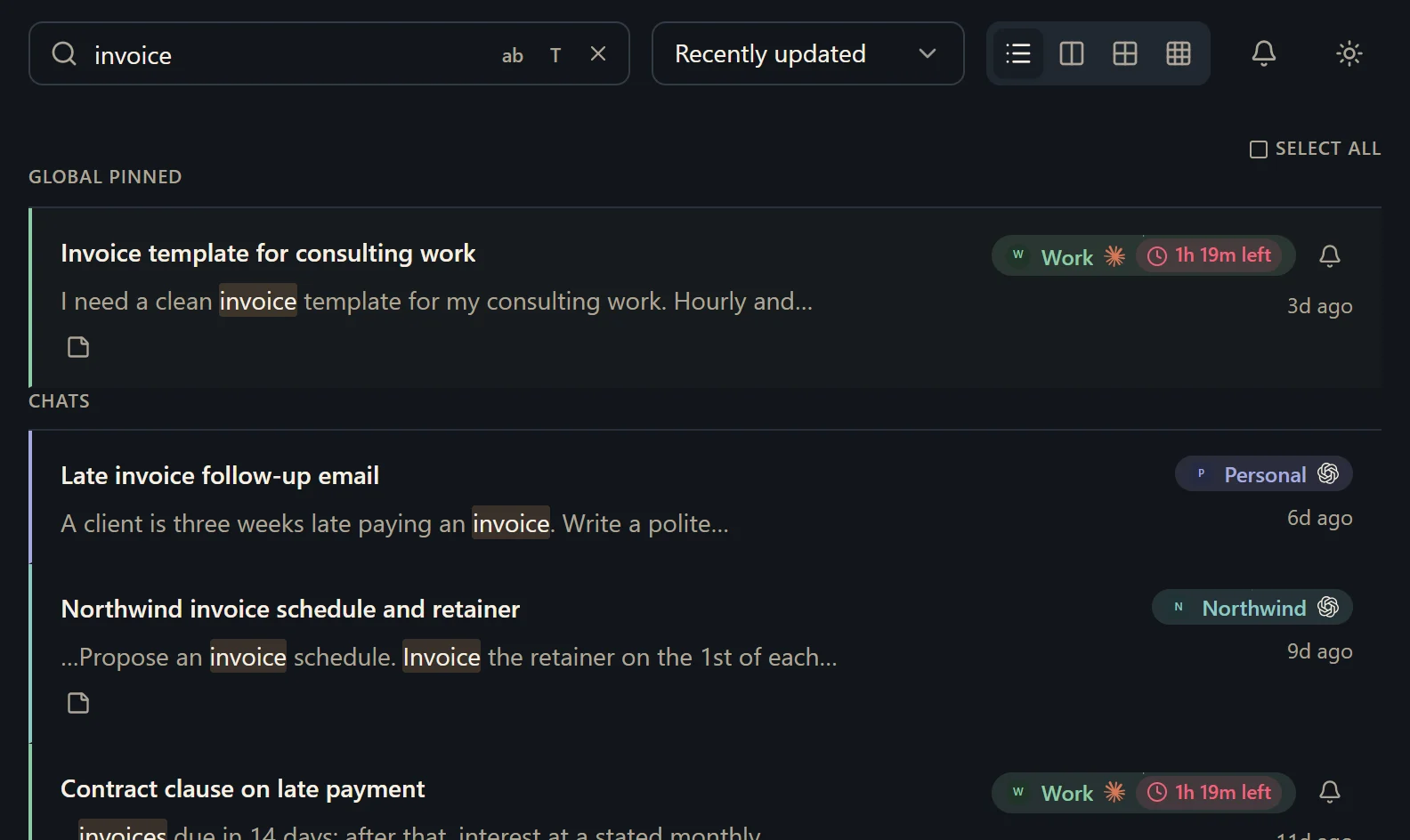
Nothing goes to a server of ours, because there isn't one: the chats sit in a database on your own computer, which you can read with any SQLite tool and export as Markdown whenever you like. Hubort only reads. It never sends, renames, archives or deletes anything in Gemini. A Google account with Keep Activity off will show no chats, and the setup guide says what to do about it.
What should I know before I try it?
It is Windows 10 and 11 only, for now. It is free for two sources. A source is one account on one provider, however many browsers it syncs from. So each Google account is one source, and three of them are three. Every install also starts with 14 days of everything, with no card. More accounts start at $4.99 a month, and the pricing page has yearly and buy-once prices.
The first read of a large Gemini account takes a while: Hubort reads a few chats a minute, and everything it has read is searchable straight away. Google may also put a check on your network while Hubort reads, which the setup guide explains.
Two things you should hear from us. The installer is not code-signed yet, so your browser and Windows will each warn you about it, and the download page says exactly what you will see. And Hubort reads each service's web app on a schedule, which may be inconsistent with that service's terms; the privacy policy has the full note, and you can lengthen the interval or untick a service at any time.
How do I try it?
Install the app, then add the extension to each browser you use Gemini in. The setup guide walks through every step, and the download page has both.
The same question for other services: ChatGPT, Claude and Grok, or all four on one page.